激安でアプリを作る際のの選択肢を増やしたいと考えていた時、そういえばできるはずと思いだした。
作ったのはこちら。Octo8080X/gcp-cloud-run-sqlite
参考 実装 ローカルからLitestreamを使ってGCSにsqliteを永続化する ローカルにDockerでLitestreamを立ち上げて、GCSにsqliteを永続化する。
ひとまず、アプリ本体を動かす最小構成 docker-compose.yaml 1 2 3 4 5 6 7 8 9 10 11 12 13 14 15 16 17 services: app: build: context: . dockerfile: dockerfile image: deno-app:latest container_name: deno-app ports: - "8000:8000" volumes: - ./:/app - deno-cache:/deno-dir command: deno task start volumes: deno-cache:
dockerfile 1 2 3 4 5 6 7 8 9 10 11 12 FROM denoland/deno:latestWORKDIR /app ENV DENO_DIR=/deno-dirCOPY . . EXPOSE 8000 CMD ["deno" , "task" , "start" ]
main.ts 1 2 3 4 5 6 7 8 9 10 11 12 13 14 15 16 function fetch (req: Request ): Response { const url = new URL (req.url ); if (url.pathname === "/api" ) { return Response .json ({ message : "Hello, world!" , time : new Date ().toISOString (), }); } return new Response ("<h1>Welcome to Deno!</h1>" , { headers : { "content-type" : "text/html" }, }); } export default {fetch};
これで、以下コマンドでサーバー起動する
1
2
$ docker comose build $ docker compose up
litestreamを入れる(local) まず、localでlitestreamを入れるにあたり以下のように直す。
docker-compose.yaml 1 2 3 4 5 6 7 8 9 10 11 12 13 14 15 16 services: app: build: context: . dockerfile: dockerfile image: deno-app:latest container_name: deno-app ports: - "8000:8000" volumes: - ./:/app - deno-cache:/deno-dir command: /run.sh volumes: deno-cache:
dockerfile 1 2 3 4 5 6 7 8 9 10 11 12 13 14 15 16 17 18 19 20 21 22 FROM litestream/litestream:0.5 .10 AS litestream_binFROM denoland/deno:latestWORKDIR /app ENV DENO_DIR=/deno-dirCOPY . . RUN deno cache main.ts EXPOSE 8000 COPY --from=litestream_bin /usr/local/bin/litestream /usr/local/bin/litestream COPY litestream.yml /etc/litestream.yml COPY run.sh /run.sh RUN chmod +x /run.sh && mkdir -p /app/data /tmp/litestream ENV DATABASE_PATH=/app/data/app.dbCMD ["/run.sh" ]
run.sh 1 2 3 4 5 6 7 8 9 10 #!/bin/sh set -euDB_PATH="${DATABASE_PATH:-/app/data/app.db} " mkdir -p "$(dirname "$DB_PATH " ) " /tmp/litestream[ -f "$DB_PATH " ] || : > "$DB_PATH " exec litestream replicate -config /etc/litestream.yml -exec "deno task start"
litestream.yml 1 2 3 4 5 dbs: - path: ${DATABASE_PATH} replicas: - type: file path: /tmp/litestream/app.db
main.ts 1 2 3 4 5 6 7 8 9 10 11 12 13 14 15 16 17 18 19 20 21 22 23 24 25 26 27 28 29 30 31 32 33 import { Database } from "@db/sqlite" ;const db = new Database (Deno .env .get ("DATABASE_PATH" ) || "/app/data/app.db" );db.exec ("PRAGMA journal_mode=WAL;" ); db.exec (`CREATE TABLE IF NOT EXISTS todos ( id INTEGER PRIMARY KEY AUTOINCREMENT, title TEXT NOT NULL, completed INTEGER NOT NULL DEFAULT 0 )` );if (db.prepare ("SELECT * FROM todos" ).all ().length == 0 ){ console .log ("Todos table already has data, skipping seeding." ); db.exec ("insert into todos (title) values('test')" ); } function handler (req: Request ): Response { const url = new URL (req.url ); if (url.pathname === "/api" ) { return Response .json (db.prepare ("SELECT * FROM todos" ).all ()); } return new Response (JSON .stringify (db.prepare ("SELECT * FROM todos" ).all ()), { headers : { "content-type" : "text/html" }, }); } export { handler };export default { fetch : handler };
ここまで用意できたら実行する。
1
2
$ docker compose build $ docker compose up
これでテストデータに入れた結果がjsonで返ってくることが確認できる。
また、data/app.db が作成されており、litestreamを経由してアクセスできることが確認できる。
litestreamを入れる(google cloud storage) 続けて、litestreamを使い、sqliteファイルをgoogle cloud storageに永続化する。
cloud storageのバケットを作成し、サービスアカウントを作成、鍵を発行しjsonファイルをダウンロードする。
これを踏まえ認証情報と接続先を書き換える。
docker-compose.yaml 1 2 3 4 5 6 7 8 9 10 11 12 13 14 15 16 17 18 services: app: build: context: . dockerfile: dockerfile image: deno-app:latest container_name: deno-app ports: - "8000:8000" environment: GOOGLE_APPLICATION_CREDENTIALS: /app/tmp/hogehoge.json volumes: - ./:/app - deno-cache:/deno-dir command: /run.sh volumes: deno-cache:
litestream.yml 1 2 3 4 dbs: - path: ${DATABASE_PATH} replicas: - url: gs://[バケット名]/litestream/app.db
これで起動する。
1
2
$ docker compose build $ docker compose up
すると、作成したバケットに書き込みが確認できるようになる。
アプリを改修して、アクセスのたびにデータを増やすなどすると、バケット内でのファイルの増え具合を見ることができた。
アプリ本体をcloud runにデプロイする cloud run への標準的な導入設定をすればOK。
で起動すると、先の書き込みの内容が反映されていませんでした。
run.sh 1 2 3 4 5 6 7 8 9 10 11 12 13 #!/bin/sh set -euDB_PATH="${DATABASE_PATH:-/app/data/app.db} " mkdir -p "$(dirname "$DB_PATH " ) " /tmp/litestreamlitestream restore -config /etc/litestream.yml -if-db-not-exists -if-replica-exists "$DB_PATH " [ -f "$DB_PATH " ] || : > "$DB_PATH " exec litestream replicate -config /etc/litestream.yml -exec "deno task start"
さらに、どうせ接続できたのでローカルでの起動と、並行させると妙な挙動をします。
sqlite界隈でいうとtruso は、readは分散しているが、writeは1つのエンドポイントに集約されていた。
アプリ本体をcloud runにデプロイする(インスタンス数N) 先の通り、Claude Run で動かす際にインスタンス数を1にしておくとこれは担保できる。
run.sh 1 2 3 4 5 6 7 8 9 10 11 12 13 14 15 16 17 18 19 20 21 22 23 24 25 26 27 28 29 30 31 32 33 34 35 36 #!/bin/sh set -euDB_PATH="${DATABASE_PATH:-/app/data/app.db} " MODE="${LITESTREAM_MODE:-replicate} " mkdir -p "$(dirname "$DB_PATH " ) " /tmp/litestreamrestore_latest litestream restore -config /etc/litestream.yml -if-replica-exists -o "${DB_PATH} .replica" "$DB_PATH " || true if [ -f "${DB_PATH} .replica" ]; then rm -f "$DB_PATH " "${DB_PATH} -wal" "${DB_PATH} -shm" mv -f "${DB_PATH} .replica" "$DB_PATH " fi } restore_latest [ -f "$DB_PATH " ] || : > "$DB_PATH " if [ "$MODE " = "read_only_sync" ]; then export APP_READ_ONLY=true ( while true ; do litestream restore -config /etc/litestream.yml -if-replica-exists -o "${DB_PATH} .next" "$DB_PATH " || true if [ -f "${DB_PATH} .next" ]; then rm -f "${DB_PATH} -wal" "${DB_PATH} -shm" mv -f "${DB_PATH} .next" "$DB_PATH " fi done ) & exec deno task start fi exec litestream replicate -config /etc/litestream.yml -exec "deno task start"
と、このようして高頻度で同期をさせる。
main.ts 1 2 3 4 5 6 7 8 9 10 11 12 13 14 15 16 17 18 19 20 21 22 23 24 25 26 27 28 29 30 31 32 33 34 35 36 37 38 39 40 41 42 43 44 45 46 47 48 49 50 51 52 53 54 55 56 57 58 59 60 61 62 63 64 65 66 67 68 69 70 71 72 73 74 75 76 77 78 import { Database } from "@db/sqlite" ;import {Hono } from "hono" ;const isReadOnly = Deno .env .get ("APP_READ_ONLY" ) === "true" ;const db = new Database ( Deno .env .get ("DATABASE_PATH" ) || "/app/data/app.db" , isReadOnly ? { readonly : true } : undefined , ); if (!isReadOnly) { db.exec ("PRAGMA journal_mode=WAL;" ); db.exec (`CREATE TABLE IF NOT EXISTS todos ( id INTEGER PRIMARY KEY AUTOINCREMENT, title TEXT NOT NULL, completed INTEGER NOT NULL DEFAULT 0 )` ); if (db.prepare ("SELECT * FROM todos" ).all ().length === 0 ) { console .log ("Todos table is empty, seeding initial row." ); db.exec ("insert into todos (title) values('test')" ); } } const app = new Hono ();function fetchTodos ( if (isReadOnly) { const reader = new Database ( Deno .env .get ("DATABASE_PATH" ) || "/app/data/app.db" , { readonly : true }, ); try { return reader.prepare ("SELECT * FROM todos order by id DESC" ).all (); } finally { reader.close (); } } return db.prepare ("SELECT * FROM todos order by id DESC" ).all (); } app.get ("/" , (c ) => { const todos = fetchTodos (); return c.html (` <h1>TODO List</h1> <form method="POST" action="/todo"> <input type="text" name="title" placeholder="New TODO" required /> <button type="submit">Add</button> </form> <ul> ${todos.map(todo => `<li>${todo.id} : ${todo.title} </li>` ).join("" )} </ul> ` );}); app.post ("/todo" , async (c) => { if (isReadOnly) { return c.text ("read-only mode" , 403 ); } const body = await c.req .parseBody (); const title = body.title ; if (typeof title !== "string" || title.length === 0 ) { return c.text ("title is required" , 400 ); } db.prepare ("INSERT INTO todos (title) VALUES (?)" ).run (title); return c.redirect ("/" ); }) export default { fetch : app.fetch };
とこのようしてデプロイすると、破綻することなく、複数台でのアクセスが可能となる。
sync-interval How often to push frames to replica 1s
litestream - Global Replica Defaults
このようになると、リアルタイム性を担保すべきAPIは、Writeにルーティングし、そうでもないものはReadにルーティングするなどの工夫がいる。
一応試す。
main.ts(抜粋) 1 2 3 4 5 6 7 8 9 10 11 12 13 14 app.post ("/todo" , async (c) => { if (isReadOnly) { return c.text ("read-only mode" , 403 ); } const body = await c.req .parseBody (); const title = body.title ; if (typeof title !== "string" || title.length === 0 ) { return c.text ("title is required" , 400 ); } db.prepare ("INSERT INTO todos (title) VALUES (?)" ).run (title); return c.redirect ("/?realtime=1" ); })
terraform(url map部分抜粋) 1 2 3 4 5 6 7 8 9 10 11 12 13 14 15 16 17 18 19 20 21 22 23 24 25 26 27 28 29 30 31 32 33 34 35 36 37 38 39 40 41 42 43 44 45 46 47 48 49 50 51 52 53 54 55 56 57 58 59 60 61 62 63 resource "google_compute_url_map" "method_router" { name = "${var.lb_name}-url-map" default_service = google_compute_backend_service.get_backend.id host_rule { hosts = [ "*" ] path_matcher = "allpaths" } path_matcher { name = "allpaths" default_service = google_compute_backend_service.get_backend.id route_rules { priority = 10 service = google_compute_backend_service.post_backend.id match_rules { prefix_match = "/" header_matches { header_name = ":method" exact_match = "POST" } } } route_rules { priority = 15 service = google_compute_backend_service.post_backend.id match_rules { prefix_match = "/" header_matches { header_name = ":method" exact_match = "GET" } query_parameter_matches { name = "realtime" exact_match = "1" } } } route_rules { priority = 20 service = google_compute_backend_service.get_backend.id match_rules { prefix_match = "/" header_matches { header_name = ":method" exact_match = "GET" } } } } depends_on = [ google_project_service.compute_api] }
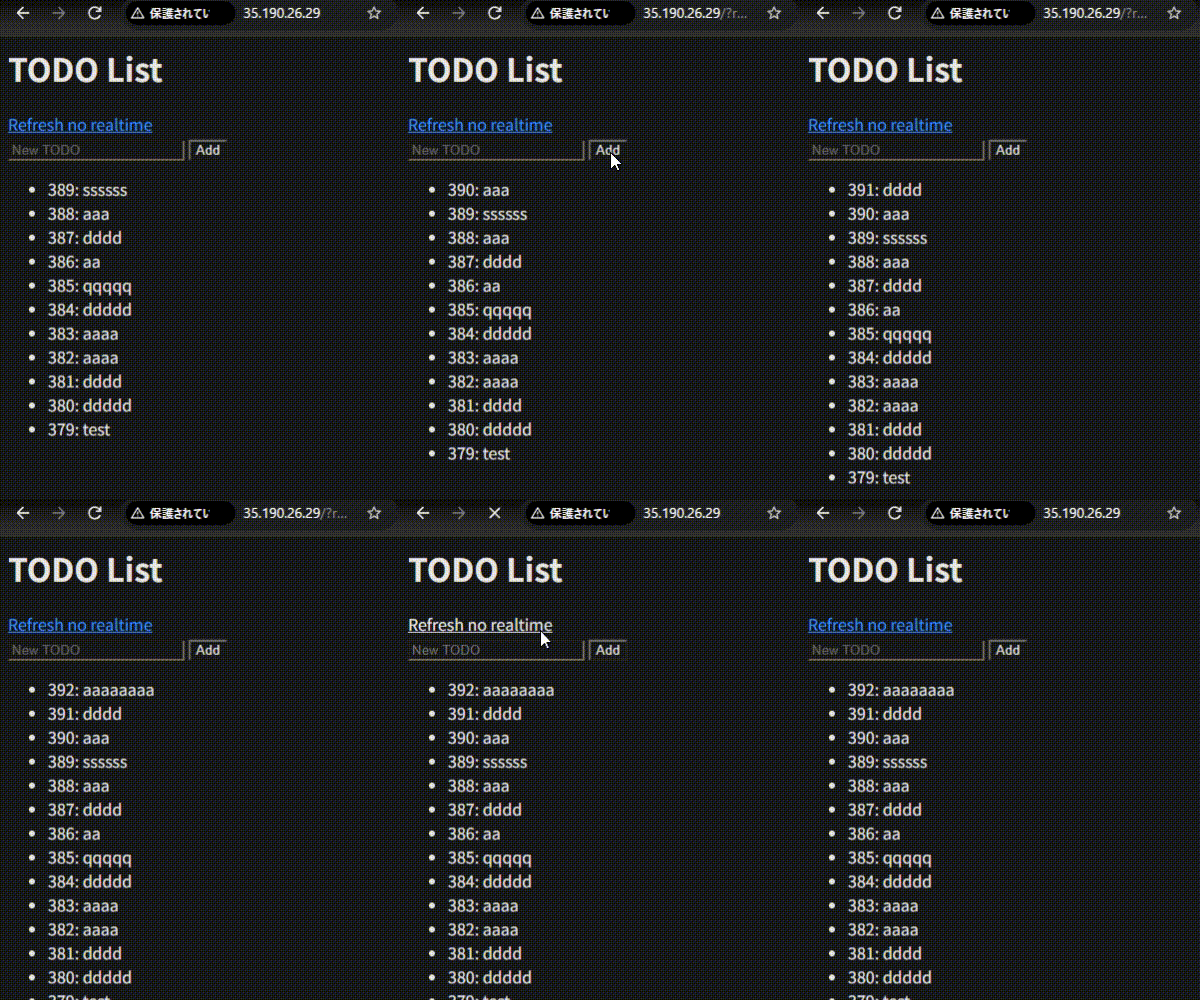
と、このように用意してデプロイすると以下のように挙動する。
クエリが付いていない場合、表示が遅延していることがわかる。
liteFS liteFS というlitestreamの作者が作った、よりリアルタイム同期性に振ったものがある。
ということで、claude run で永続化した sqlite を使う方法を確認してみた。
昨今、様々なサービスがフリー利用枠の消滅しているが、この方法であればかなり抑えられるのではなかろうか?
では。