Rails x Reactな環境で、無限スクロールをあまり作ったことがなかったので試す。
参考 実装 前提1 前提として、Articlesモデルがあり、id とcomment カラムがあるとします。
key
type
id
integer
comment
string
created_at
datetime
updated_at
datetime
データは大量にあり、実はいろいろ付加情報があるので、それなりに1件当たりデータを作ることに負荷があるとします。
前提2 一応、ログインしているユーザーに対して、配信するということで、ユーザー認証はしているとします。
実装 Rails側 Rails は、標準でActionController::Liveを提供している。
app/controllers/articles_controller.rb 1 2 3 4 5 6 7 8 9 10 11 12 13 14 15 16 17 18 19 20 21 22 23 24 25 26 27 28 29 30 31 32 33 34 35 36 37 38 39 40 41 42 43 44 45 46 47 48 49 50 51 52 53 54 55 56 class ArticlesController < ApplicationController include ActionController::Live def index session[:user_id ] = 1 end def stream unless valid_session? response.headers['Content-Type' ] = 'text/event-stream' sse = SSE .new(response.stream, retry: 300 , event: 'error' ) sse.write({ error: 'Unauthorized' , message: 'Invalid or missing cookie' }) sse.close return end response.headers['Content-Type' ] = 'text/event-stream' response.headers['Cache-Control' ] = 'no-cache' response.headers['Connection' ] = 'keep-alive' response.headers['X-Accel-Buffering' ] = 'no' sse = SSE .new(response.stream, retry: 300 , event: 'article' ) sleep 0.5 begin max_id = params[:id ].present? ? params[:id ].to_i : Article .maximum(:id ).to_i + 1 articles = Article .where(id: (max_id-50 )...max_id).order(id: :desc ).limit(5 ) articles.each do |article | sse.write({ id: article.id, comment: article.comment, created_at: article.created_at }) 10 .times { sleep 0.02 } end has_more = Article .where('id < ?' , articles.last&.id |0 ).exists? sse.write({ done: true , has_more: has_more, last_id: articles.last&.id }, event: 'complete' ) rescue ActionController : :Live : :ClientDisconnected , Errno : :EPIPE , IOError , Interrupt Rails .logger.info "SSE stream interrupted or client disconnected" ensure sse.close rescue nil end end private def valid_session? session[:user_id ].present? end end
開発時サーバーの停止が、Ctrl+C であっても、SSEのストリームが開いていると応答が悪くなる。force_shutdown_after 0 をPumaの設定に追加。
config/puma.rb これを入れたうえで、シミュレーション用のsleepは細かく刻んだ結果、応答が良くなった。
実装 React側 EventSource版 React側は、EventSource API を使ってSSEを受け取る。
src/components/ArticleList.tsx 1 2 3 4 5 6 7 8 9 10 11 12 13 14 15 16 17 18 19 20 21 22 23 24 25 26 27 28 29 30 31 32 33 34 35 36 37 38 39 40 41 42 43 44 45 46 47 48 49 50 51 52 53 54 55 56 57 58 59 60 61 62 63 64 65 66 67 68 69 70 71 72 73 74 75 76 77 78 79 80 81 82 83 84 85 86 87 88 89 90 91 92 93 94 95 96 97 98 99 100 101 102 103 104 105 106 107 108 109 110 111 112 113 114 115 116 117 118 119 120 121 122 123 124 125 126 127 128 129 130 131 132 133 134 135 136 137 138 139 140 141 142 143 144 145 import { useCallback, useEffect, useRef, useState } from "react" ;interface Article { id : number ; comment : string ; created_at : string ; } interface StreamCompleteData { has_more : boolean ; last_id : number | null ; } function Articles ( const [articles, setArticles] = useState<Article []>([]); const [isLoading, setIsLoading] = useState (false ); const [error, setError] = useState<string | null >(null ); const [hasMore, setHasMore] = useState (true ); const [lastId, setLastId] = useState<number | null >(null ); const eventSourceRef = useRef<EventSource | null >(null ); const observerRef = useRef<IntersectionObserver | null >(null ); const loadMoreNodeRef = useRef<HTMLDivElement | null >(null ); const isIntersectingRef = useRef (false ); const stateRef = useRef ({ hasMore, isLoading, lastId }); stateRef.current = { hasMore, isLoading, lastId }; const fetchArticlesRef = useRef<(id?: number ) => void >(() => {}); const fetchArticles = (id?: number ) => { if (eventSourceRef.current ) { eventSourceRef.current .close (); } setIsLoading (true ); setError (null ); const url = id ? `/articles/stream?id=${id} ` : "/articles/stream" ; const eventSource = new EventSource (url); eventSourceRef.current = eventSource; eventSource.addEventListener ("article" , (event ) => { const article : Article = JSON .parse (event.data ); setArticles ((prev ) => [...prev, article]); }); eventSource.addEventListener ("complete" , (event ) => { const data : StreamCompleteData = JSON .parse (event.data ); setHasMore (data.has_more ); setLastId (data.last_id ); setIsLoading (false ); eventSource.close (); eventSourceRef.current = null ; }); eventSource.onerror = () => { setError ("Connection error" ); setIsLoading (false ); eventSource.close (); eventSourceRef.current = null ; }; }; fetchArticlesRef.current = fetchArticles; useEffect (() => { fetchArticles (); return () => { if (eventSourceRef.current ) { eventSourceRef.current .close (); } if (observerRef.current ) { observerRef.current .disconnect (); } }; }, []); const loadMoreRef = useCallback ((node: HTMLDivElement | null ) => { if (observerRef.current ) { observerRef.current .disconnect (); } loadMoreNodeRef.current = node; if (node) { observerRef.current = new IntersectionObserver ( (entries ) => { isIntersectingRef.current = entries[0 ].isIntersecting ; const { hasMore, isLoading, lastId } = stateRef.current ; if (entries[0 ].isIntersecting && hasMore && !isLoading && lastId) { fetchArticlesRef.current (lastId); } }, { threshold : 0.5 }, ); observerRef.current .observe (node); } }, []); useEffect (() => { if (lastId && hasMore && !isLoading && isIntersectingRef.current ) { fetchArticles (lastId); } }, [lastId, hasMore, isLoading]); return ( <div className ="articles" > <h1 > Articles</h1 > {error && <p className ="error" > {error}</p > } <table style ={{ borderCollapse: "collapse " }}> <thead > <tr > <th > ID</th > <th > Comment</th > <th > Created At</th > </tr > </thead > <tbody > {articles.map((article) => ( <tr key ={article.id} style ={{ height: "100px " }}> <td style ={{ border: "2px solid #DDD " }}> {article.id}</td > <td style ={{ border: "2px solid #DDD " }}> {article.comment}</td > <td style ={{ border: "2px solid #DDD " }}> {new Date(article.created_at).toLocaleString()} </td > </tr > ))} </tbody > </table > <div ref ={loadMoreRef} style ={{ height: "50px ", margin: "20px 0 " }}> {isLoading && <p > Loading... ({articles.length} articles loaded)</p > } {!hasMore && <p > All articles loaded ({articles.length} total)</p > } </div > </div > ); } export default Articles ;
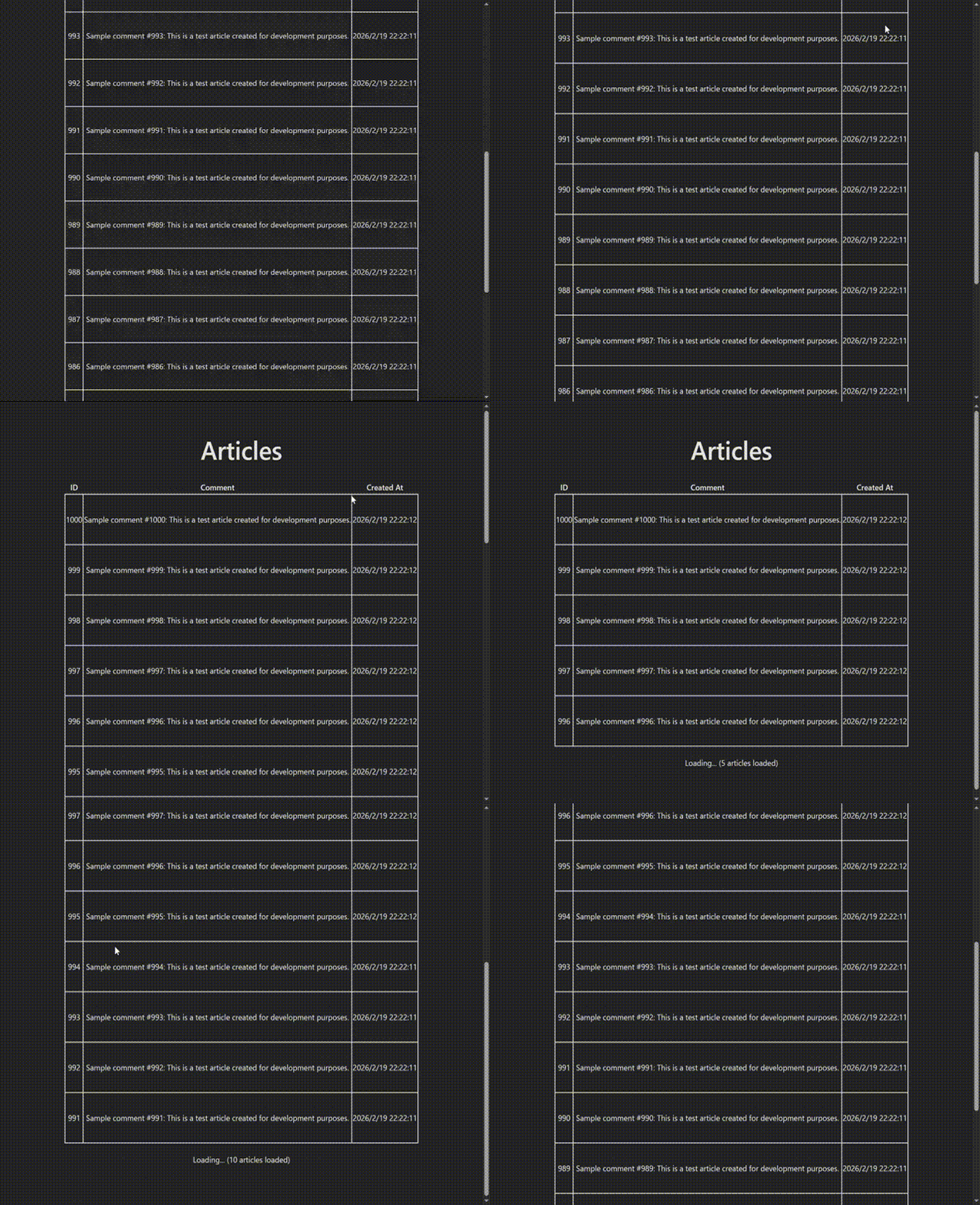
動かすと以下のように一件ずつ表示され、末尾に到達すると再度取得に行く。
実装 React側 Fetch API版 EventSource ではなく、Fetch API を使ってストリーミングを受け取る方法もある。
1 2 3 4 5 6 7 8 9 10 11 12 13 14 15 16 17 18 19 20 21 22 23 24 25 26 27 28 29 30 31 32 33 34 35 36 37 38 39 40 41 42 43 44 45 46 47 48 49 50 51 52 53 54 55 56 57 58 59 60 61 62 63 64 65 66 67 68 69 70 71 72 73 74 75 76 77 78 79 80 81 82 83 84 85 86 87 88 89 90 91 92 93 94 95 96 97 98 99 100 101 102 103 104 105 106 107 108 109 110 111 112 113 114 115 116 117 118 119 120 121 122 123 124 125 126 127 128 129 130 131 132 133 134 135 136 137 138 139 140 141 142 143 144 145 146 147 148 149 150 151 152 153 154 155 156 157 158 159 160 161 162 163 164 165 166 167 168 169 170 171 172 173 174 175 176 177 178 179 180 181 182 183 184 185 186 187 188 189 import { useCallback, useEffect, useRef, useState } from "react" ;interface Article { id : number ; comment : string ; created_at : string ; } interface StreamCompleteData { has_more : boolean ; last_id : number | null ; } function Articles ( const [articles, setArticles] = useState<Article []>([]); const [isLoading, setIsLoading] = useState (false ); const [error, setError] = useState<string | null >(null ); const [hasMore, setHasMore] = useState (true ); const [lastId, setLastId] = useState<number | null >(null ); const abortControllerRef = useRef<AbortController | null >(null ); const observerRef = useRef<IntersectionObserver | null >(null ); const loadMoreNodeRef = useRef<HTMLDivElement | null >(null ); const isIntersectingRef = useRef (false ); const stateRef = useRef ({ hasMore, isLoading, lastId }); stateRef.current = { hasMore, isLoading, lastId }; const fetchArticlesRef = useRef<(id?: number ) => void >(() => {}); const fetchArticles = async (id?: number ) => { if (abortControllerRef.current ) { abortControllerRef.current .abort (); } const abortController = new AbortController (); abortControllerRef.current = abortController; setIsLoading (true ); setError (null ); const url = id ? `/articles/stream?id=${id} ` : "/articles/stream" ; try { const response = await fetch (url, { signal : abortController.signal , headers : { "Accept" : "text/event-stream" , }, }); if (!response.ok ) { throw new Error (`HTTP error: ${response.status} ` ); } const reader = response.body ?.getReader (); if (!reader) { throw new Error ("Response body is not readable" ); } const decoder = new TextDecoder (); let buffer = "" ; while (true ) { const { done, value } = await reader.read (); if (done) break ; buffer += decoder.decode (value, { stream : true }); const lines = buffer.split ("\n" ); buffer = lines.pop () || "" ; let eventType = "" ; let eventData = "" ; for (const line of lines) { console .log ("Received line:" , line); if (line.startsWith ("event:" )) { eventType = line.slice (6 ).trim (); } else if (line.startsWith ("data:" )) { eventData = line.slice (5 ).trim (); } else if (line === "" && eventType && eventData) { if (eventType === "article" ) { const article : Article = JSON .parse (eventData); setArticles ((prev ) => [...prev, article]); } else if (eventType === "complete" ) { const data : StreamCompleteData = JSON .parse (eventData); setHasMore (data.has_more ); setLastId (data.last_id ); } eventType = "" ; eventData = "" ; } } } setIsLoading (false ); abortControllerRef.current = null ; } catch (err) { if (err instanceof Error && err.name === "AbortError" ) { return ; } setError ("Connection error" ); setIsLoading (false ); abortControllerRef.current = null ; } }; fetchArticlesRef.current = fetchArticles; useEffect (() => { fetchArticles (); return () => { if (abortControllerRef.current ) { abortControllerRef.current .abort (); } if (observerRef.current ) { observerRef.current .disconnect (); } }; }, []); const loadMoreRef = useCallback ((node: HTMLDivElement | null ) => { if (observerRef.current ) { observerRef.current .disconnect (); } loadMoreNodeRef.current = node; if (node) { observerRef.current = new IntersectionObserver ( (entries ) => { isIntersectingRef.current = entries[0 ].isIntersecting ; const { hasMore, isLoading, lastId } = stateRef.current ; if (entries[0 ].isIntersecting && hasMore && !isLoading && lastId) { fetchArticlesRef.current (lastId); } }, { threshold : 0.5 }, ); observerRef.current .observe (node); } }, []); useEffect (() => { if (lastId && hasMore && !isLoading && isIntersectingRef.current ) { fetchArticles (lastId); } }, [lastId, hasMore, isLoading]); return ( <div className ="articles" > <h1 > Articles</h1 > {error && <p className ="error" > {error}</p > } <table style ={{ borderCollapse: "collapse " }}> <thead > <tr > <th > ID</th > <th > Comment</th > <th > Created At</th > </tr > </thead > <tbody > {articles.map((article) => ( <tr key ={article.id} style ={{ height: "100px " }}> <td style ={{ border: "2px solid #DDD " }}> {article.id}</td > <td style ={{ border: "2px solid #DDD " }}> {article.comment}</td > <td style ={{ border: "2px solid #DDD " }}> {new Date(article.created_at).toLocaleString()} </td > </tr > ))} </tbody > </table > <div ref ={loadMoreRef} style ={{ height: "50px ", margin: "20px 0 " }}> {isLoading && <p > Loading... ({articles.length} articles loaded)</p > } {!hasMore && <p > All articles loaded ({articles.length} total)</p > } </div > </div > ); } export default Articles ;
Fetch API ReadableStream を扱う。console.log('Received line:', line); により取り出したデータは以下のようになっている。
1
2
3
4
5
6
7
8
9
10
11
12
13
14
15
16
Received line: retry: 300 Received line: event: article Received line: data: {"id":1000,"comment":"Sample comment #1000: This is a test article created for development purposes.","created_at":"2026-02-19T13:22:12.057Z"} Received line: Received line: retry: 300 Received line: event: article Received line: data: {"id":999,"comment":"Sample comment #999: This is a test article created for development purposes.","created_at":"2026-02-19T13:22:12.044Z"} Received line: Received line: retry: 300 Received line: event: article Received line: data: {"id":998,"comment":"Sample comment #998: This is a test article created for development purposes.","created_at":"2026-02-19T13:22:12.033Z"} ... Received line: retry: 300 Received line: event: complete Received line: data: {"done":true,"has_more":true,"last_id":991}
EventSource では、eventSource.addEventListener("article", (event) => {... でイベント風に見える。event: article のようにデータ見える。
こういうのをちゃんと確認できれば「得体のしれない何か」にならない。
Server-Sent Events を自前で書いてみる。 RailsのActionController::Liveを使った場合、どういったデータを送り込んでいるのか確認できた。
app/controllers/articles_controller.rb Server-Sent Events 自前版 1 2 3 4 5 6 7 8 9 10 11 12 13 14 15 16 17 18 19 20 21 22 23 24 25 26 27 28 29 30 31 32 33 34 35 36 37 38 39 40 41 42 43 class ArticlesController < ApplicationController def stream2 response.headers['Content-Type' ] = 'text/event-stream' response.headers['Cache-Control' ] = 'no-cache' response.headers['Connection' ] = 'keep-alive' response.headers['X-Accel-Buffering' ] = 'no' response.stream.write("#{' ' * 2080 } \n\n" ) sleep 0.5 begin max_id = params[:id ].present? ? params[:id ].to_i : Article .maximum(:id ).to_i + 1 articles = Article .where(id: (max_id-50 )...max_id).order(id: :desc ).limit(5 ) articles.each do |article | data = { id: article.id, comment: article.comment, created_at: article.created_at }.to_json response.stream.write("event: article\n" ) response.stream.write("data: #{data} \n\n" ) 10 .times { sleep 0.02 } end has_more = Article .where('id < ?' , articles.last&.id |0 ).exists? complete_data = { done: true , has_more: has_more, last_id: articles.last&.id }.to_json response.stream.write("event: complete\n" ) response.stream.write("data: #{complete_data} \n\n" ) rescue ActionController : :Live : :ClientDisconnected , Errno : :EPIPE , IOError , Interrupt Rails .logger.info "Stream interrupted or client disconnected" ensure response.stream.close rescue nil end end end
というわけで、SSEクラスを使わずとも、同様のことはできる。
無限スクロール、ストリーミング形式レスポンスの実装を試しました。
実際使う場合、Server-Sent Events 生で書いていくことは無いでしょうが、やってみることは大事です。
では。